

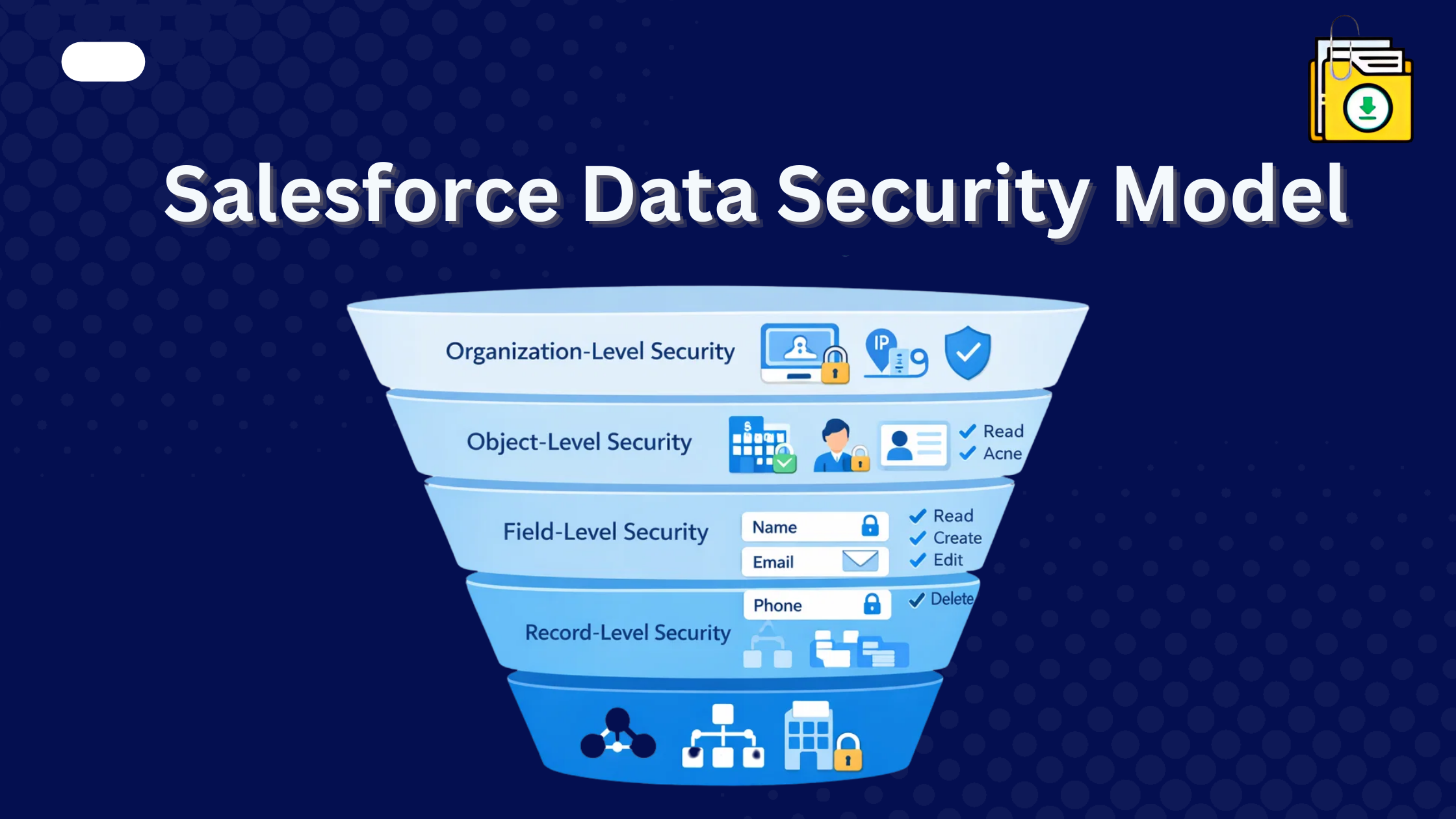


Salesforce is trusted by thousands of companies to manage sensitive customer data, sales pipelines, documents, and communications. Because of this, data security is a fundamental part of the Salesforce CRM.
Thank you for reading this post, don't forget to subscribe!The Salesforce Data Security Model ensures that users only access the information they are authorized to see. It uses a layered approach that controls access from the highest level of the organization down to individual records and fields.
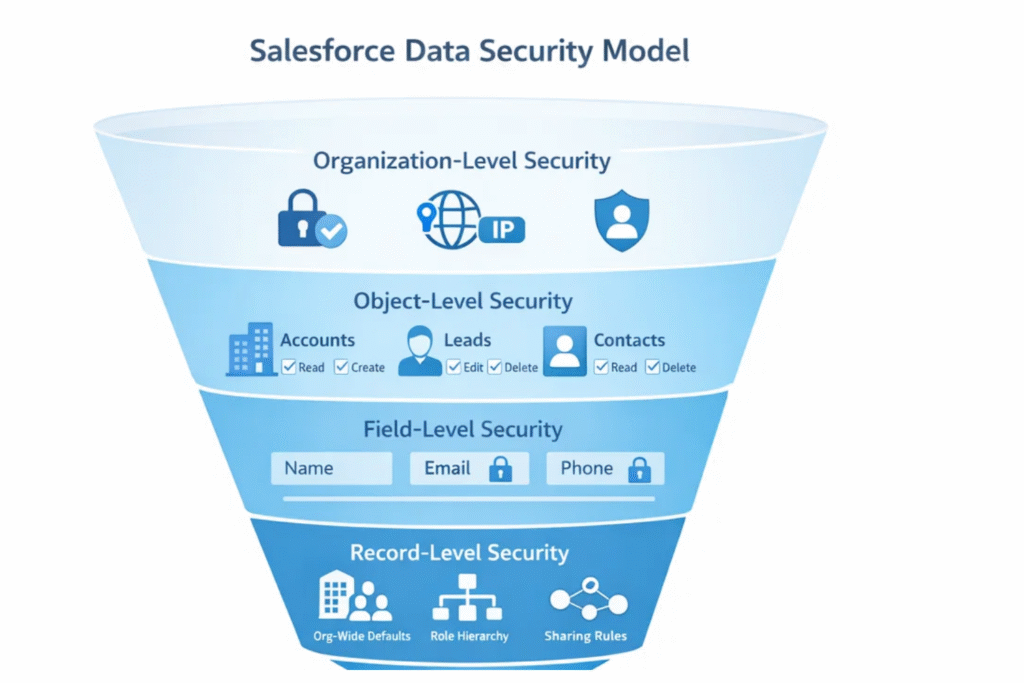
Think of the Salesforce security model like a funnel. At the top, it controls who can log in to the system. As you move downward, the controls become more detailed, determining which objects, records, and even fields a user can access.
This guide explains the Salesforce security layers and how they work together to protect business data.
The Salesforce Security Pillar: Layered Access Control
Salesforce security is built using multiple layers. Each layer provides a different level of control over data visibility and permissions.
The major security layers include:
- Organization-level security
- Object-level security
- Field-level security
- Record-level security
Together, these layers create a powerful data protection framework.
1. Organization-Level Security (Who Can Log In)
The first layer controls who can access the Salesforce organization at all. Administrators can restrict access using:
1. Login IP Ranges
Admins can specify which IP addresses users can log in from. This prevents unauthorized access from unknown networks.
2. Login Hours
Login hours restrict the times users are allowed to access Salesforce. For example, a company may allow system access only between 8 AM and 6 PM to prevent after-hours activity.
This layer acts like the security guard at the front gate.
2. Object-Level Security (What Users Can Access)
Object-level security determines which objects users can interact with. This level controls whether a user can Create, Read, Edit, or Delete (CRED) any records of a specific type, such as Leads or Opportunities. Object access is primarily controlled using:
Profiles
Every Salesforce user must have a profile. Profiles define what users are allowed to do with objects. For example, a sales rep may be able to create and edit Leads, while a support user may only have read access.
Permission Sets
Permission sets allow administrators to grant additional permissions without modifying a user’s profile. For instance, if only a few users need access to a specific custom object, a permission set can grant that access. Think of permission sets as extra privileges added to a user’s existing role. They are the “VIP passes” of Salesforce.
3. Field-Level Security (Which Fields Are Visible)
Even when a user has access to an object, certain fields may contain sensitive information that should remain restricted. Field-Level Security (FLS) allows administrators to control:
- Whether users can view a field
- Whether users can edit a field
For example: A sales representative may see the Account Name but not the Annual Revenue field.
This ensures that confidential data is only accessible to authorized roles. Field-Level Security acts like a confidential label on specific information within a record.
4. Record-Level Security (Which Records Users Can See)
Record-level security determines which specific records a user can access. This is the most detailed layer of the Salesforce data security model. This is often the most confusing part for new admins. If two users have the same profile, how do you make it so User A can’t see User B’s deals?
We use four tools to manage this:
- Organization-Wide Defaults (OWD): This is your “Base Level.” If you want the most security, set this to Private. If OWD is set to Private, users can only see records they own. Other options include: Public Read Only, Public Read/Write or Controlled by Parent.
- Role Hierarchy: This automatically opens access vertically. Managers can always see what their subordinates own. This ensures proper visibility for leadership and reporting.
- Sharing Rules: These open access horizontally. You can share records between teams (e.g., “Share all West Coast Leads with the East Coast Team”).
- Manual Sharing: A “one-off” way for a record owner to share a specific file with a colleague for a limited time.
The Golden Rule of Salesforce Security
One of the most important concepts in Salesforce security is that access is additive. Salesforce primarily grants access rather than restricting it. Here is how it works:
- Organization-Wide Defaults create the baseline restriction
- Role hierarchy, sharing rules, and permissions open access further
If a user cannot see a record, the first place to check is the OWD setting. If they can see the record but certain fields are missing, the issue likely involves Field-Level Security.
Conclusion
Now that you understand how the Salesforce data security model protects your records, fields, and files, you can manage your data with greater confidence.
If your team needs to download attachments, documents, or Salesforce files in bulk while maintaining folder structures and metadata, a Salesforce-native tool can simplify the process.
Files Downloader allows administrators to export Salesforce files securely while automatically honoring existing security settings such as profiles, sharing rules, and field permissions.