Talk to Expert


Your One-Click Solution to Export All Data from Salesforce
Download from List Views
Use our tool to mass export files from Salesforce list views without opening each record. It’s perfect for Salesforce users who want to quickly export list views to Excel or download files & attachments from Salesforce in bulk, directly based on the filters they apply.
Thank you for reading this post, don't forget to subscribe!- Works with both standard and custom list views
- Export mass files and attachments from any list views
- Download files & attachments from Salesforce in the exact format
- Fastest way to export Salesforce files without using complex tools
100% Native to Salesforce
Our Salesforce file exporter is built entirely on the Salesforce platform – no downloads, plugins, or third-party systems required. It’s the most secure and efficient way to export data from Salesforce without leaving your CRM.
- Seamless experience within your existing Salesforce UI
- No need for external tools like Salesforce data loader apps
- Ensures compliance with Salesforce security and governance
- Built using native Salesforce components and Lightning-ready
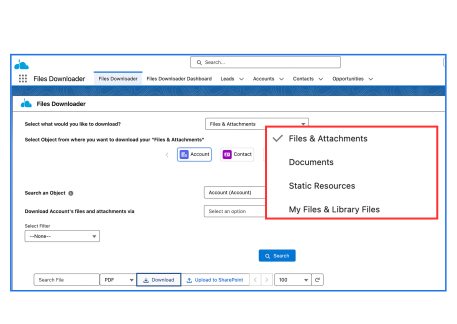
Bulk Export Files, Attachments & Documents, jpg, PNG and others
Effortlessly mass export files from Salesforce, including attachments, documents, and media files like .jpg and .png. Ideal for data migrations, audits, and backups- no more downloading one file at a time.
- Supports all file types: PDFs, images (.jpg, .png), docs, and more
- Export Salesforce files in bulk from standard and custom objects
- A must-have file exporter for Salesforce admins and data teams
- Works perfectly with Salesforce data export & file management needs
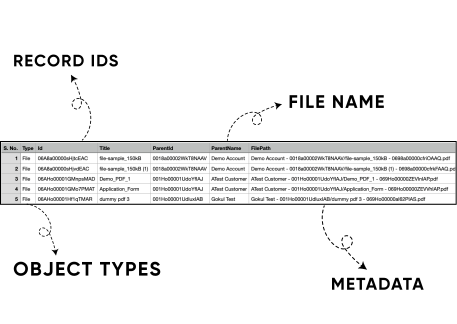
CSV Mapping with Every Download- Delivered to Your Inbox
After every bulk files export from Salesforce, a CSV mapping file is automatically generated and emailed to you. This file maps each attachment to its record, making your Salesforce data export fully traceable and organized.
- Automatically emailed after each export
- Works seamlessly with your Salesforce data loader workflows
- CSV includes file names, record IDs, object types, and metadata
- Perfect for auditing, compliance, or importing into SQL Server or Excel
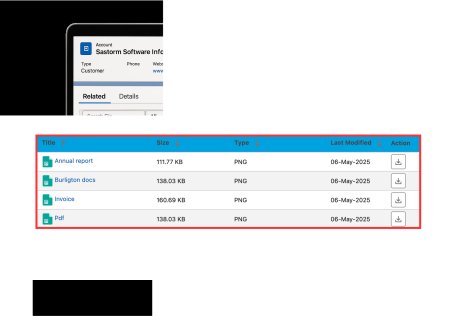
Supports All Standard & Custom Salesforce Objects
Whether you’re working with Accounts, Opportunities, or custom-built objects, our app lets you export data from Salesforce effortlessly from all standard and custom objects. It’s built to adapt to your exact setup.
- Easily extract data from Salesforce records
- Works with all standard and custom Salesforce objects
- Ideal for complex orgs with highly customized environments
- A powerful companion to any Salesforce data loader tool or file exporter
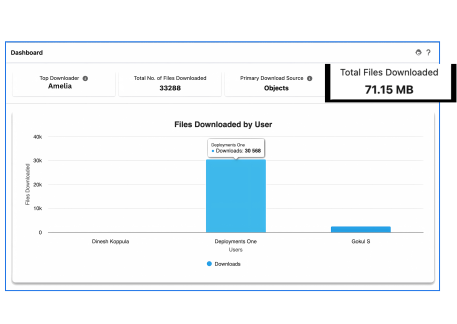
Dashboard & Tracking Reports
Stay in control of your Salesforce data exports with built-in dashboards and export history tracking. Know who exported how many files, and their source – perfect for teams that need transparency and compliance.
- Great for audit trails and compliance reporting
- View status, file counts, and export completion times
- Visual tracking dashboard for recent and historical exports
- Complements tools like the Salesforce data loader app and file exporter Salesforce solutions
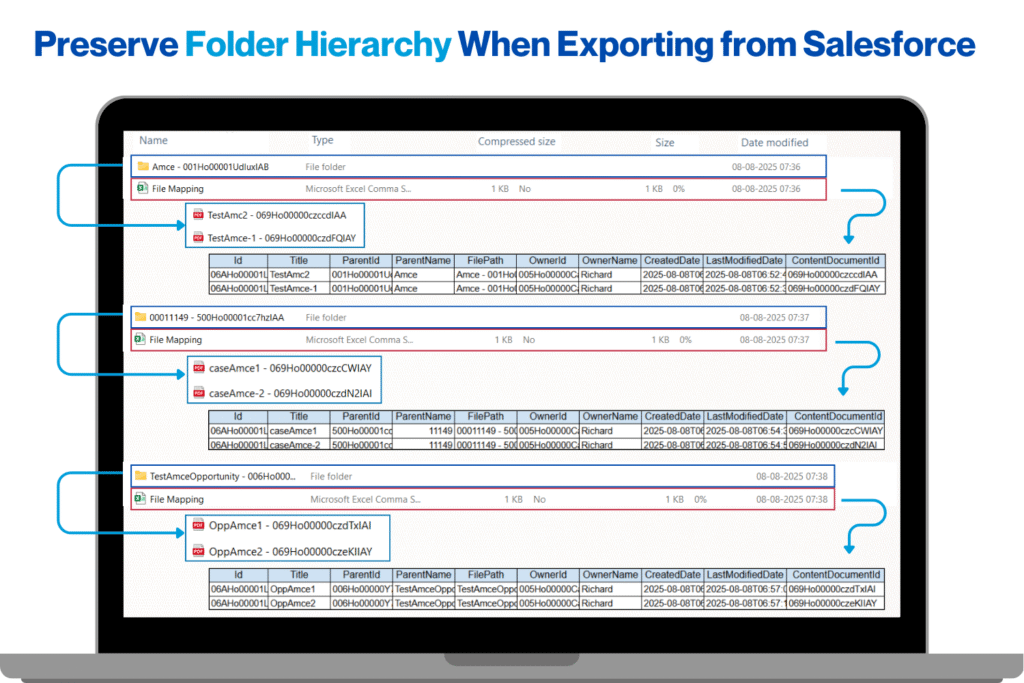
Preserve File Names, Folder Structures & Metadata
Maintain the integrity of your data during export. Our tool ensures that every file you export from Salesforce retains its original name, folder hierarchy, and associated metadata – so nothing gets lost in translation.
- Ideal for clean migrations, audits, and system backups
- Keep metadata like owner, object type, and record association
- Preserve original file names and folder structures during export
- Makes it easier to import Salesforce data into SQL Server or Excel post-export

Secure & Compliant
Your data is protected at every step. Our Salesforce file exporter is designed to meet strict security and compliance requirements, ensuring every Salesforce data export is handled with confidence and care.
- 100% built on Salesforce - no external data transfers
- Passed all the security review, compliance check from Salesforce
- Adheres to Salesforce security, permission sets, and sharing rules
Export Data from Salesforce to SQL Server
Easily export files and attachments from Salesforce by specifying a SOQL query. This option lets you filter and retrieve only the data you need, such as files linked to certain accounts, opportunities, cases, or custom objects.
- Save time by avoiding manual data sorting
- Filter and extract only the files relevant to your criteria in a single step
- Simplify complex data downloads by targeting specific objects & fields
- Access the latest data instantly by customizing & running your own SOQL query
- Ready to See It in Action?
Try Files Downloader, Salesforce File Export Tool — Free for 7 Days
Still not sure if it’s the right fit? Experience the full power of our Salesforce file exporter with a risk-free trial.
Easily export Salesforce data and attachments, explore advanced features, and discover how seamless and secure bulk exporting can be — no credit card required.